App Dev · · 4 min read
NetLay: A device catalog, hubs on the desk, and what a device really is
A make and model library, network devices that refuse to live in a cabinet, the fields an inventory actually needs, and a blank page caused by one line of state code.
Typing the same thing forty times#
The problem with the last build was tedium. Adding a switch meant telling NetLay how many ports it had and what they were called, every single time, and adding a printer meant typing the make and model by hand even though it was the eighth identical printer in the building.
So this post is mostly about a catalog.
It is a library of makes and models, for switches, for hubs and for the things on the end of a cable. Switch models carry their port modules with them, which means picking a C9300-48P from the list gives you a switch that already has forty eight copper ports and the right uplink cage, rather than a blank one you have to describe. Choosing a model on a device fills in its make, model and type.
It ships with thirty six entries, a dozen switches, half a dozen small desk switches and hubs, and eighteen end devices from the usual suspects. If you edit one of the built-in entries it quietly becomes your own copy, so the next time the app seeds its defaults it does not undo your work. That last part took about four lines and has saved me from myself more than once.
The devices that will not live in a cabinet.#
Here is a thing that is obvious in a building and annoying in a database. Not every switch is in a comms room.
There is one under the desk in the back office, there is a five port thing behind the TV in reception, and there is almost always something unmanaged that somebody added years ago without telling anyone. They are real, they carry real devices, and in my data model they were impossible, because a switch belonged to a cabinet and that was that.
So a switch can now have no cabinet at all. If it hasn't got one it keeps its own position on the map instead and sits out there where it physically is, with the role "hub, unmanaged". Everything else came along for free, because an uplink is still an uplink and a port is still a port, which is the nice thing about getting the port model right before you need it.
The migration was the interesting part. Making that column nullable in SQLite means rebuilding the table, since you cannot simply relax a NOT NULL. There are two traps in doing that and I found both. Foreign keys with cascade delete will happily take the child rows with them when you drop the old table, and PRAGMA foreign_keys does nothing at all inside a transaction, which is exactly where you would think to put it.
What a device record actually needs.#
With a catalog in place, the device record itself could stop being so thin. It now holds make, model, serial number, firmware version, MAC address and asset tag, which between them cover most of what anybody doing an audit is holding a clipboard for.
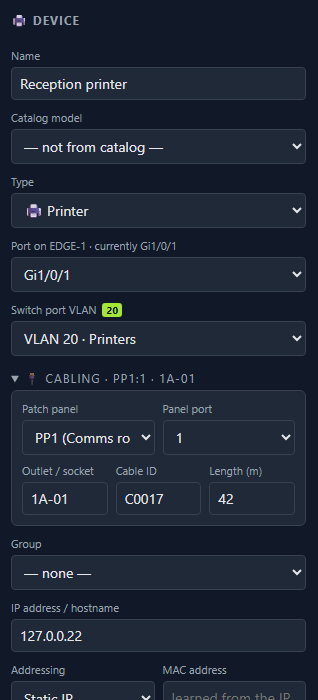
The list of types grew as well, from seven to seventeen. The original seven were printer, UPS, access point, camera, PC, server and other, which it turns out is a list written by somebody thinking about a comms room rather than a building. Laptops, IP phones, televisions, NAS boxes, routers, firewalls, door access controllers, industrial controllers, kiosks and the great catch-all of anything with an IP address that somebody stuck on a wall.
There is one field in this build I am not proud of. VLAN is free text on the device, which is wrong in a way I will explain properly next time, because a VLAN does not belong to a device at all.
The blank page.#
One bug from this stretch is worth writing down, because it cost me an evening and the cause is three words long.
After adding the catalog, the whole app started rendering a blank white page. No error anybody could see, no failed request, nothing in the server log. Just nothing.
The culprit was a selector in the state store that filtered a list, something along the lines of taking the catalog and returning only the switches. That reads innocently. The trouble is it builds a brand new array every time it runs, and the store compares what comes back with what came back last time to decide whether anything changed. A fresh array is never equal to the previous one, so the answer is always yes, something changed, so render again, so run the selector again, forever, until the page gives up.
The fix was to select the whole catalog, which is stable, and do the filtering outside. One line moved, and the lesson is that a function which looks pure can still be a loop if somebody is comparing its output by identity.
Next time, virtual machines that have no port of their own, and putting VLANs where they actually belong.