App Dev · · 4 min read
NetLay: Getting Cisco port names right
Switches that talk to each other, port modules, stack cables, and why the second switch in a stack is not called what I assumed it was called.
Switches need to talk to each other#
I left the last post complaining about two things I had got wrong, so this one is about putting them right.
The first was that a cabinet in NetLay was a box with a summary written inside it. Two switches, so many ports used out of so many. That is fine until the day somebody asks which of the three switches in the comms room the camera is on, and your map shrugs at you.
Switches now have a role, core or distribution or edge, and they can be joined to each other with uplinks. An uplink takes a port at each end, because that is what an uplink actually is, and the rule I settled on is that a port is one of three things. A device, an uplink, or free. Never two of them at once. Ports carrying an uplink show a ⇅ in the port list so you can see at a glance where the rest of the network goes, and the uplinks themselves are drawn as thick blue lines with the port names on them.
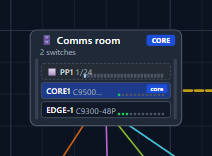
The cabinets grew up at the same time. They are drawn as racks now, with each switch as a row you can click, and lines from devices anchor to the row for the switch they are actually plugged into rather than to the cabinet in general.
Ports are not a number.#
The second thing I got wrong was bigger. Ports were integers.
Real switches are not built that way. They have built-in ports, and then they have a network module with a handful of SFP or SFP+ cages in it, and then they have stack ports round the back, and all three are numbered differently. So a switch in NetLay is now a list of port modules instead of a count, and each module has a type, RJ45 or SFP or SFP+ or QSFP or stack, along with a prefix, a slot and how many ports it has.
That sounds like bookkeeping and it is, but it is the bookkeeping that makes the port names come out right. There are presets for the chassis I see most, the C9300, C9200, C9500 and C2960X, and for the network modules that go in them, so adding a switch gives you the ports that switch really has rather than a tidy row of forty eight.
The naming rule, researched before written.#
Here is the note I wrote for myself before I touched any of it.
"when a switch is stacked the second switch updates the numbering if it is a cisco switch it would go from Gi1/0/1 -Gi1/0/48 on switch 1 then on switch two it would be Gi1/1/1 - Gi1/1/48 but please research that before implementing it."
I am very glad I added that last clause, because I was wrong.
Cisco names a port as type, then member, then module, then port. The first digit is the stack member. Module 0 is the built-in ports and module 1 is the network module. So the second switch in a stack is Gi2/0/1 and not Gi1/1/1 at all. Gi1/1/1 already means something else entirely, it is the first port of the uplink module on switch one, and if I had gone with my memory I would have produced a map that confidently told people the wrong thing about their own kit.
The research took twenty minutes with the 9300 stacking guide open, and the outcome was that the app's numbering was already correct and I changed nothing. That is a perfectly good result. Twenty minutes to find out you don't need to do anything is a bargain compared with the alternative.
You can pick the style you prefer, short, long, the int1/0/1 form or plain numbers, because everybody's half of the industry writes them differently.
Stacking.#
Stack cables came next, as a link type between stack ports in the same cabinet, with the rule that the two ends have to be different member numbers. Two cables between them makes a StackWise ring, and stacked switches get a purple badge showing their member number.
There is a user interface lesson buried in this one. The server correctly refused to let both switches be member one, and said so in a toast notification, and I missed my own error message about four times in a row because it appeared in the corner while I was looking at the middle of the screen. So now there is an inline warning that sits next to the thing that is wrong, saying both switches are stack member one, with a button that offers to make the second one member two. The toast got bigger as well.
Nobody reads a message that appears somewhere they are not looking. I knew that, and I still had to irritate myself four times before I did anything about it.
What is still wrong#
Devices are getting there. What they are is still vague, because a device in NetLay is a name, an address, a type and not much else, and anybody doing a real inventory wants make, model, serial and a dozen other things.
Next time, a proper catalog, and what happens when a network device refuses to live in a cabinet.