App Dev · · 4 min read
NetLay: Virtual machines, VLAN colours and selecting more than one thing
Virtual machines have no port of their own, VLANs belong to the switch port rather than the device, and the map finally lets you pick up more than one thing at a time.
A VM has no port#
Everything in NetLay so far has plugged into something. A printer is on Gi1/0/1, a camera is on Gi1/0/14, and the line on the map is a cable that exists in the building.
Then you get to the server with twelve virtual machines on it, and the model falls over, because those twelve machines are absolutely real, they have addresses, they answer pings, people care a great deal when they stop, and not one of them is plugged into anything. They are hosted by something that is.
So a device can now have a parent. A virtual machine sits on its host, inherits the host's connection to the network, and is drawn with a dotted line back to it rather than a cable, because a dotted line is a relationship and a solid one is a wire. They get pinged like anything else. There are new types for virtual machines and containers, with templates in the catalog for the usual Windows and Linux builds.
One rule, firmly: a VM cannot host VMs. One level of nesting only. The day somebody genuinely needs nested hypervisors drawn on a map I will think about it again, and I suspect that day will not come.
Twelve of them on one server.#
Drawing twelve dotted lines out of one server turns the area round it into a spider. So a host with several machines on it folds them up inside its own node instead, the same way a cabinet holds its switches, with one row per machine, a status dot and a VLAN bar on each.
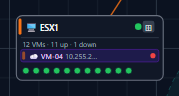
There is a small purple badge with the count on it that folds and unfolds the list, so you can have the detail when you are looking at that server and get your map back when you are not.
VLANs belong to ports.#
I admitted last time that VLAN was a free text field on the device and that it was wrong. Here is why.
A VLAN is not a property of a printer. The printer knows nothing about it. The VLAN is a property of the switch port the printer is plugged into, and if somebody re-patches that printer to a different port it is in a different VLAN without anything about the printer having changed at all. Putting the field on the device means that every time reality changes, your documentation stays confidently wrong, which is the exact failure this whole application exists to prevent.
So VLANs are now a proper table of their own, assigned per port, with a colour each from a palette of twelve. Device lines take the colour of the VLAN on the port they are connected to, which means the map tells you the shape of your network at a glance, and the printers being a different colour from the staff machines is something you see rather than something you look up.
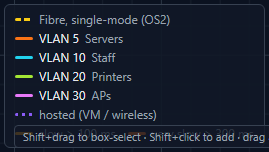
Virtual machines can carry their own VLAN or inherit the host's, because both happen in real life depending on how the host is trunked.
Migrating the old text field was the kind of job that is either five minutes or a week. It was five minutes, because the old values were almost all just numbers. Pull the digits out of the text, create any VLAN that doesn't exist yet, assign it, then drop the column. The handful that said something like "staff vlan" needed a human look, and there were few enough that the human could be me on a Tuesday evening.
Selecting more than one thing.#
The last piece of this build is the least clever and the one I use most.
You can shift and drag a box round part of the map and select everything in it. Shift and click adds one more. Drag any of the selected things and they all move together, keeping their arrangement. Delete removes the lot after asking, Escape puts everything down again.
That took an afternoon and it changed how the app feels more than the VLAN work did, which I think is the honest lesson of this post. The VLAN change is the one that makes the documentation true. Box select is the one that makes you willing to tidy the map up, and a map nobody is willing to tidy goes stale, which brings you right back to the drifting Visio drawing I started this whole thing to get away from.
Next time, fibre and cable types, devices that are allowed to stay quiet, more than one building plan, and getting the whole thing into a folder you can carry.