App Dev · · 5 min read
NetLay: The subnet knows the VLAN
Still waiting on switch configs, I got the one thing the network team could send quickly, a list of subnets, and it turns out that is enough to know which VLAN everything is in.
Not the exports, but something#
Nine posts ago I was waiting on the central network team for switch configurations. I am still waiting.
What did arrive is the thing they could send quickly, which is four CSV exports from the address management system, one per site, about a hundred and thirty six subnets between them. Each row has a network, a VLAN number, sometimes only inside a free text comment, a purpose, a zone and how full it is.
That tells you nothing about switches, ports or devices. It tells you every address range in the building and which VLAN it belongs to, and that turns out to be worth a great deal.
The first thing I did with it was not write code. I read it, and the sites turned out to be mid migration to a standard design, the same set of management, guest, client and transit subnets everywhere, plus one depot with a separate tiny network per production machine. An hour of reading saved me from writing a parser for the wrong shape of data.
Why VLANs could not simply hold a subnet.#
The obvious move is to put a subnet field on the VLAN record. It does not work.
NetLay VLANs are global, so VLAN 500 is one colour on every map. But VLAN 500 is a different subnet at every site, and at one site a single VLAN had two subnets.
So subnets are their own table, per layout, each pointing at a VLAN number. That is the whole design decision and everything else follows from it.
Parsing real exports.#
Real data is never the shape the documentation implies.
Columns are found by their headings with a list of synonyms, since a network might be a single CIDR, or a base address plus a prefix, or a base and a top address. VLAN numbers are often only in the description, written as VLAN 500, or rVLAN604, or inside a name code like VL-XXX-INF-06-3500, and an explicit VLAN column wins when both exist.
Classification markers wrapped in section signs get stripped from purposes, as do repeated fragments, because something upstream had been concatenating a field with itself.
The section sign was also the clue that the files were not UTF-8 but Windows-1252, which is the kind of thing you find out by seeing one odd character and chasing it.
Each subnet then gets a kind from keywords, switch management, AP management, clients, Wi-Fi, servers, machines, building services, guest, transit. And plain lines like 10.0.10.0/24 VLAN 10 Staff work too, for anyone who does not have an address management system and is typing it from a whiteboard.
One file, several sites.#
The import groups rows by their site column and matches each site to the layout with the same name. Anything it cannot match defaults to skip, so an unrecognised site never quietly lands in whichever map happened to be open.
Re-importing next month updates in place, with an option to remove subnets the export no longer lists. New VLANs get named after their first subnet, and existing VLAN names are left alone, because the same number means something different at another site and I am not having the import rename things behind somebody's back.
What knowing the subnet buys you.#
A device whose port has no VLAN set now takes the VLAN of whichever subnet its address is in. That one sentence improves the cable colours, the duplicate address check and the DHCP conflict check, all without any of them changing.
For virtual machines and wireless clients the address beats the host's port VLAN, because the host's port is usually a trunk carrying everything.
And then the check I actually wanted. If a port says VLAN 10 and the device's address is in VLAN 20's subnet, one of those is wrong.
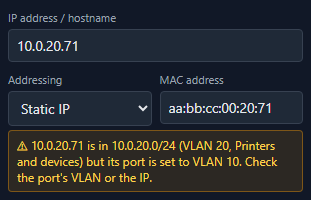
On a map typed in by a human that is precisely the mistake you want caught, and until now there was no second source to catch it with.
Inferred is not the same as set.#
The first real import produced a complaint from me about ten minutes later: the printer had not picked up its VLAN.
It had. The cable colour was using it. But wired devices still read the port VLAN directly in two other places, and the inspector field and the sidebar chip only ever showed what was set on the port, so two parts of the screen said one thing and two said another.
Every place that shows a VLAN now uses the same rule, the port's VLAN if there is one and the address plan's if not, and a VLAN known only from the address is drawn as an outlined chip rather than a solid one. Inferred stays visibly inferred until you decide to commit it, either one device at a time or for a whole site.
There was a sillier lesson in the same hour. The server had been running for ten days, so it did not have the new routes at all and kept answering method not allowed. Front end changes reload themselves and back end changes do not, and I have now written that on a note.
Keeping other people's networks out of it#
One last thing, since this is the first post where real data from a real organisation entered the project.
The exports never left the machine. They are ignored by git, they are not in the zip, and every test and every help picture uses invented sites called things like Demo office and Warehouse 2. One column heading named after an internal tool nearly made it into a commit and was generalised to a prefix match before it did.
That is the last post in this run, which takes the series from an empty folder to where NetLay actually is today. There is a list of about twenty five things I noticed while commenting the code, so it is not finished, but it is caught up.