App Dev · · 4 min read
NetLay: Drawing the air, wireless clients and device groups
A map built entirely around cables meets the half of the network that has none, and the same trick turns out to fix the clutter problem as well.
A map built around cables#
Here is the question that started this one, written in my notes as bluntly as that.
"How would be best to show wireless devices?"
Every single thing in NetLay up to now has been on the end of a cable. There is a mesh system at home and proper access points at work, and between them a few dozen phones, laptops and tablets, none of which are plugged into anything and all of which people care about when they stop working.
The wrong answer is to make a wireless client sit on a switch port anyway. It would be a lie, and worse, it would be a lie that the reality check from post ten would then have to spend its time undoing every time somebody pasted a MAC table.
Radio is not a cable.#
The right answer turned out to be something I had already built.
A virtual machine hangs off its host because it has no port of its own. A wireless client hangs off its access point for exactly the same reason. It is the same relationship, so it is the same mechanism, with one new field saying which kind of hosting this is, plus the things that are specific to radio: the SSID, the band and the signal strength.
What matters is that it looks different. The line is faint and dashed, there are signal arcs at the client end that light up according to how strong the signal is, and there is no travelling pulse on it, because a pulse represents traffic moving along a cable and there is no cable. Making radio look like radio is most of the work in this post.
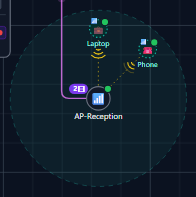
Access points, routers and firewalls can take clients. Printers cannot, which sounds obvious and is the sort of rule you only get right by writing it down.
SSIDs are the VLANs of the air.#
There is a small table of SSIDs per layout now, each one mapped to a VLAN, with its band, its security and a hidden flag. Clients take the colour of their SSID unless they carry their own VLAN.
The order of precedence is a client's own VLAN first, then its SSID's VLAN, then the port VLAN of the access point it is attached to. That is three fallbacks deep and every one of them happens in real buildings, which is why it is written down in the app and not just assumed.
Renaming an SSID follows through to the clients on it, because the alternative is a table that slowly stops matching the controller.
Access points can also carry an optional coverage circle, translucent, drawn at whatever radius you give them. It is not a heat map and it does not pretend to be, it is a reminder of roughly how far that thing reaches when you are looking at a floor plan and wondering why the far end of the warehouse is unhappy.
The same idea, generalised.#
Once clients could fold into an access point the way VMs fold into a server, the clutter problem had an obvious general answer.
Reception has six PCs on six ports. They are six separate devices, they matter individually when one breaks, and ninety nine percent of the time you want to look at them as one thing called "Reception PCs".
So there are device groups. A collapsed group is a single card standing in for its members, and the cables from all of them run to the card, which sits where the members were. Expanded, it becomes a dashed frame with a name tab and the devices inside it where they always were.
You make one by shift dragging a box round some devices and choosing to group them, or from a dropdown on a device, or from the add menu. Dissolving a group leaves everything exactly where it was, which is the behaviour that makes people willing to try it.
What is still missing#
Mesh backhaul, properly. A satellite node in a mesh system is a wireless client that is itself an access point, and the model only allows one level of hosting, so today it is a client and the things on it attach to the main node. It is on the list and it needs the rule relaxed carefully rather than removed.
The bigger gap is that all of this is typed in. Real association data from a controller would mean the map could correct itself as people wander round the building, and that is the version of this feature I actually want.
Next time, getting the switches to introduce themselves.