App Dev · · 3 min read
NetLay: Type an IP, see the map jump
A search box that indexes everything on the map, focusing a single VLAN, saved views, and a wall mode that turns the whole thing into something you glance at.
The app knew the answer, I just could not ask it#
Two questions kept coming up while I used this thing, and neither had an answer that did not involve scrolling.
What is on 10.20.0.50, and where is Gi1/0/12?
NetLay knew both perfectly well. There was simply no way to ask, which is a particular kind of annoying, because it means the data model is finished and the application is not.
One box.#
There is a search box now, on Ctrl+K or just the forward slash key.
It builds its index in the browser from the layout you already have open, so it is instant and there is no server round trip. Everything goes in it. Cabinets, patch panels, switches with their model and management address and serial, every switch port by name, every device and virtual machine with its address, MAC, model, serial, asset tag and outlet, and every VLAN in use.
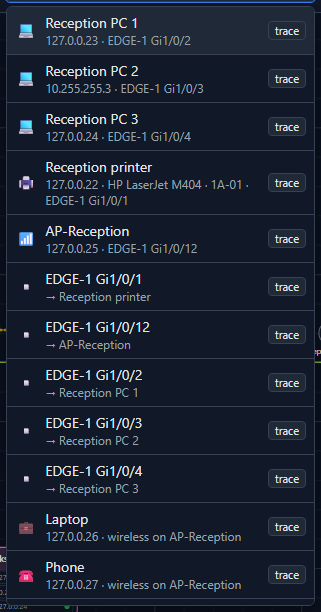
The scoring runs from an exact name match at the top, through a name that starts with what you typed, through a name that contains it, then an exact match on a field like an address or a MAC, and finally a loose match anywhere. Twelve results shown, because a search that returns everything has not answered anything.
It is built for the keyboard throughout. Arrows to move, Enter to jump to the thing on the map, and Shift+Enter to select it together with the core switch so the path lights up between them, which turns "where is this device" into "how does traffic get to this device" with one extra key.
Focusing one VLAN.#
Click a VLAN in the legend, or search for it, and everything that is not in it dims right down.
That is a small feature with a big effect on a busy site. Seeing just the printers, or just the access points, or just whatever lives in VLAN 5, turns a map with two hundred devices on it into an answerable question. Click again or press Escape and it all comes back.
Saved views.#
Once you can focus a VLAN and move the camera, the obvious next thing is to keep the combination.
A saved view is a camera position, an optional VLAN focus and a dwell time. They are stored with the layout, so editors can save them and anyone who can see the layout can use them, which means "printers on floor two" becomes one click for everybody rather than a thing you set up each time.
The wall.#
And then, because the views were sitting there, wall mode.
Full screen, no panels, no sidebar. Just the map, with a status strip across the top showing the layout and view name, counts of how many devices are up, slow and down, how many are waiting, and a clock. It cycles through the saved views on their own timers until somebody presses Escape.
I think this is the point where the application became the thing I originally wanted. A small team does not need a monitoring dashboard with graphs on a screen in the corner. Nobody reads graphs on a wall. What they need is a picture of the building where the dots are green, so that when one of them is not, somebody walking past notices without being on call or reading anything.
While I was in there#
The toolbar had been growing a button at a time since post one and had finally started scrolling off the edge of the window, which is the user interface equivalent of a pile of papers on a chair.
It is now three menus, Add, View and Tools, which wrap instead of overflowing, with ping all, the search box, the views button and the account menu on the right. Nothing was removed and everything is one click further away, which is the trade you make when a tool grows up.
Next time, learning the network from nothing but what Windows already has on it.